How to add JSON-LD SEO to a WordPress page
This is a WordPress page. Unlike a WordPress post, where you configure the “content”, here you build the structure of the container. You tell the page whether it is a Collection, a Product, a Service, or an institutional page.
The plugin does not inject code fragments. It builds a coherent Knowledge Graph. This prevents content cannibalization and lets Google and AI bots (such as ChatGPT and Gemini) understand the relationships between your pages.
What the SEO Semantic plugin does on a page
The interface adapts to the type of container you choose. No useless fields, no ontological errors. Here are the four main scenarios you can configure.
1. CollectionPage (Pillar / Hub)
If the page is a list that gathers other pages (e.g. “All Services”), choose CollectionPage. The plugin generates a node that helps the crawler understand the context and prevents cannibalization.
Note: Google does not provide Rich Snippets for CollectionPages, but the Schema Validator reads them perfectly. FAQs are intentionally disabled on this type: a collection does not need FAQs, it is a container.
2. Service
If the page describes a service (e.g. “SEO Consulting”), choose Service. The plugin links the WebPage to its mainEntity, declaring the provider and the area served.
Note: Here too, the Rich Results Test may tell you “No items detected” (unless you have reviews). This is normal: a Service has no bare visual snippet, but its ontology is perfect.
3. Product
If you sell a physical or digital product, choose Product. Fill in price, currency, availability, and brand. The plugin will generate a complete graph with an Offer.
Note: Here the Rich Results Test lights up! You will see the “Product snippet” and the “Merchant listings”. If you do not add genuine reviews, it will give you yellow warnings (non-critical) for the missing AggregateRating.
4. Institutional Pages
For About Us, Privacy, or Contact, choose the correct type (e.g. AboutPage). These pages do not need Rich Snippets, but they must be linked to the site and the organization to strengthen EEAT.
The plugin panel in action
This is what the interface looks like when you work on a page.
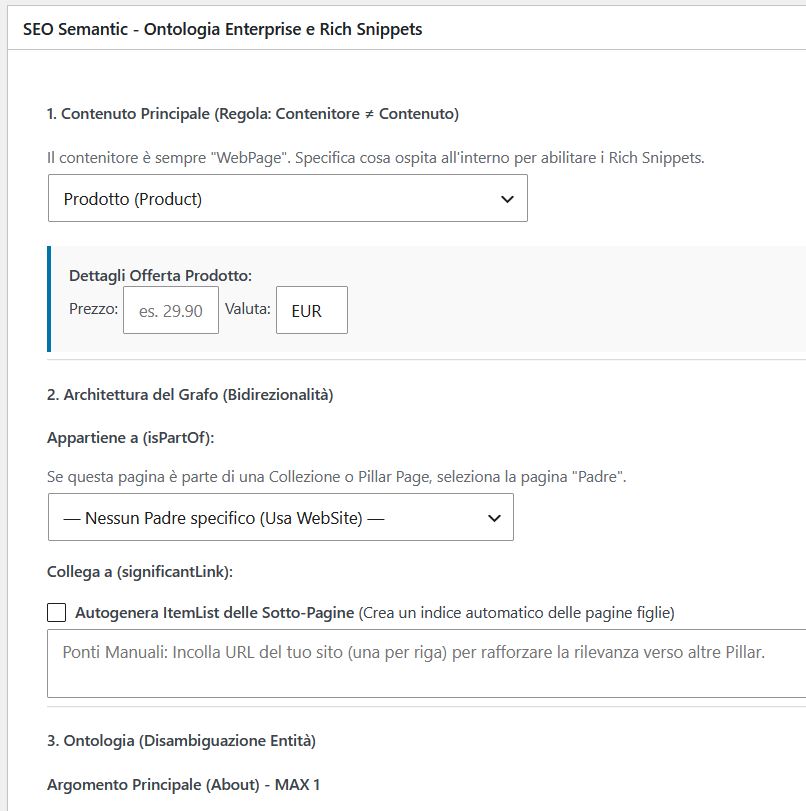
The basic page configuration
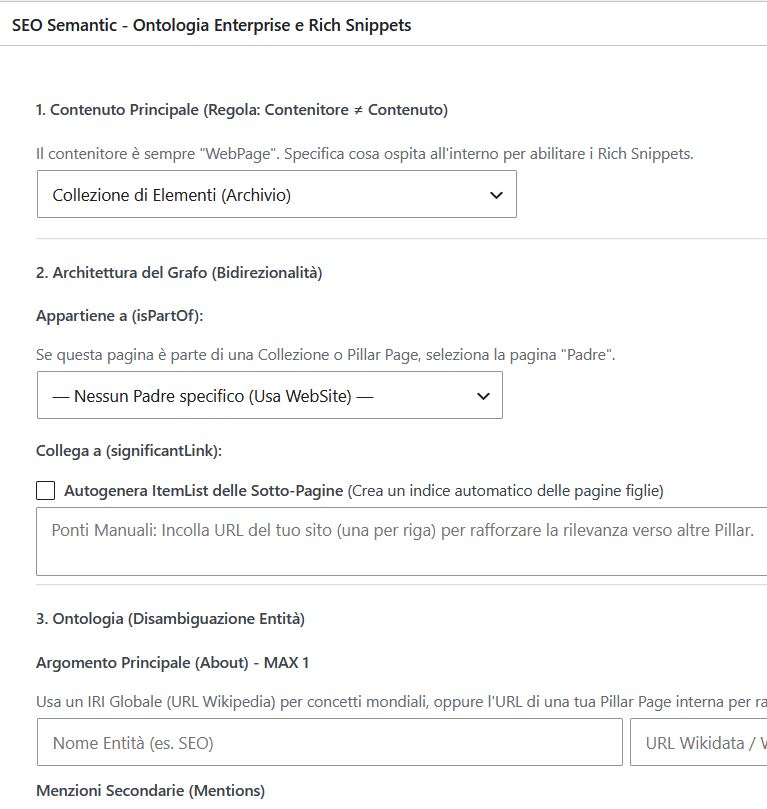
Choosing the Collection Page
The Proof: One Single Graph, Zero Errors
Traditional plugins inject code fragments. SEO Semantic builds a single @graph, linking the page to the site’s main entity and to the other sections. Here is the actual code generated for this page (set as a CollectionPage).
The Unified Graph (CollectionPage + FAQ)
Note how the WebPage declares its isPartOf towards the WebSite and its about towards an external entity, while the significantLink properties create semantic bridges to the other guides. This helps the crawler understand the context and prevents cannibalization.
// Excerpt of the generated Knowledge Graph
{
  "@context": "https://schema.org",
  "@graph": [{
    "@type": "CollectionPage",
    "@id": "https://www.imwaa.com/blog/json-ld-seo-su-pagina-wordpress/#webpage",
    "isPartOf": { "@id": "https://www.imwaa.com/blog/#website" },
    "about": { "@type": "Thing", "name": "Wordpress seo" },
    "significantLink": ["https://www.imwaa.com/blog/json-ld-seo-su-wordpress/#webpage"]
  }, {
    "@type": "FAQPage",
    "@id": "https://www.imwaa.com/blog/json-ld-seo-su-pagina-wordpress/#faq",
    "isPartOf": { "@id": ".../#webpage" }
  }]
}
Schema Validator:
0 Errors, 0 Warnings. 3 Items (CollectionPage, WebSite, FAQPage).
Rich Results Test:
“No items detected”. This is correct: CollectionPages do not generate visual snippets in SERP.
Service (or Product) case: the Content replaces the Container
If, instead of a collection, you choose a Service or a Product, the WebPage changes its mainEntity. The graph remains unified, but the content type changes. If you choose Product with a price, the Rich Results Test lights up with the Product Snippet.
// Example with Service: the WebPage has a mainEntity
{
  "@type": "WebPage",
  "@id": ".../#webpage",
  "isPartOf": { "@id": "https://www.imwaa.com/blog/#website" },
  "about": { "@type": "Thing", "name": "Wordpress ottimizzato" },
  "mainEntity": { "@id": ".../#service" }
}
Note: If you choose Product, the Rich Results Test will report “2 non-critical issues” (yellow warnings) for the missing rating. They are not blocking errors, but if you have genuine reviews, add them in the plugin to show the stars in SERP.
Why the Unified Graph beats traditional plugins
Semantics and Ontology
Regular plugins inject a code fragment that is not linked back to the site’s main entity. Our plugin, through the @id properties and the isPartOf property, tells Google: “This page is part of this site, it is about this topic (about), and it has these significant links (significantLink)”. This is what allows AI systems to understand the relationships between your pages.
Preventing Cannibalization
Declaring that a page is a CollectionPage helps the crawler understand that this URL is a container (a Pillar), not a single piece of content. This prevents the collection page from competing for the same keyword as a specific article. It is siloing taken to the code level.
To understand how these rules are applied, read the Schema.org Audit guide. To test your graphs, use the Schema.org validator and the Rich Results Test.
Looking for the guide for Posts?
This page explains how to configure the container. If you need to understand what happens inside a post — the #article entity, author, date, review block — the right guide is the other one.